Who fed the dog?
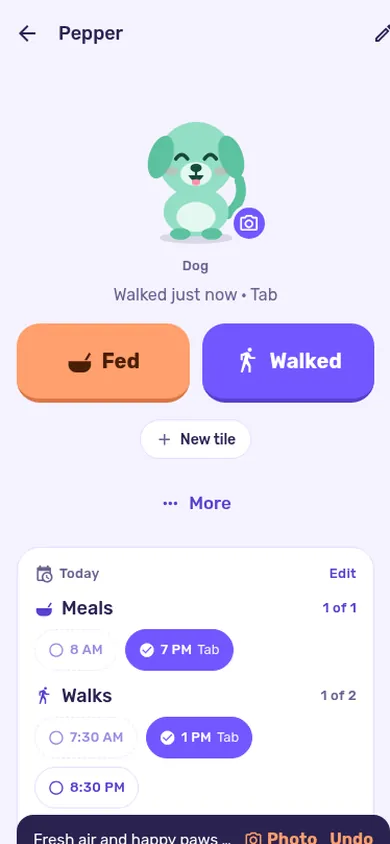
One shared board for everyone at home. Tap Fed or Walked, and the whole family sees it right away.

On a computer? Point your phone’s camera here to get PupShift on it.
Go on, tap Fed on Max
- Whose turn?Walks rotate on their own
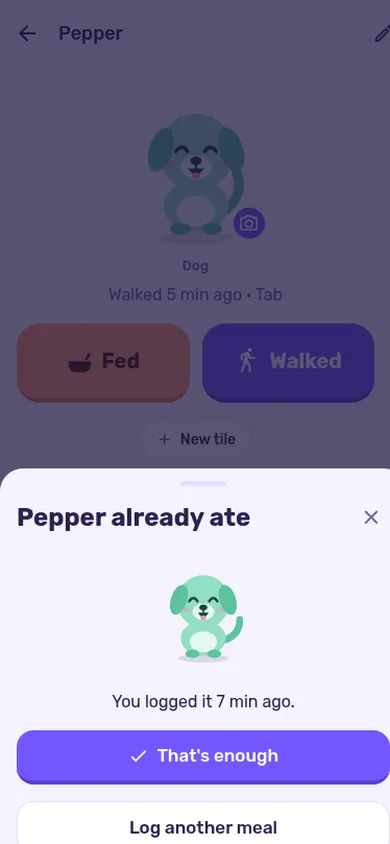
- Already ateStops a second dinner
- ThanksSay it with one tap
- Weekly cupA little friendly competition
Sound familiar?
The fridge door, before PupShift.
Did anyone feed Max??
WHO walked him this morning
Fed him at 7! (Noa)
…me too at 7:30 (Dan)
Max ate a sock. Again.
And after
One board. Nobody has to ask.
Every meal, walk and pill lands on one shared board, with who did it and when. Phones at home ring when it matters, so the dog gets fed once, on time.
- Max ateNoa tapped Fed · 7:02
- Already ate 11 minutes agoSo Dan skipped the second breakfast
- Walked by MomNext walk: Noa · 13:00
Meanwhile, the dog’s side of the story
Max’s diary. Tuesday.
- Stared at Dad until breakfast happened. Four minutes. Personal best.
- Mom came down. Did the sad eyes. Breakfast #2.
- Grandma visited. Grandma doesn’t ask questions. Cheese.
- Dinner (Noa).
- Dinner (Dad: “he looks hungry”).
- Everyone thinks someone else walked me. Nobody walked me. Holding it like a hero.
Then they got PupShift. Now everyone sees “Fed 6:00 PM · Noa”. Worst app ever.
★☆☆☆☆One star out of five, from Max— Max
Max is made up. His tricks are not.
The 20-second quiz
Which dog are you at home?
Five questions, twenty seconds, zero judgment. Some judgment.
Take the quiz
A day at Pepper’s home
Every phone at home knows. Nobody has to ask.
Alerts ring in the iPhone and Android app with alerts on. The website shows the same board, without alerts.
What makes it different
Small moments that keep a whole house on the same page.
Whose turn?
PupShift keeps track of who did what, and shows who is up next. No more "I did it yesterday".
Max already ate 11 min agoGot it, that's enough
Already ate
Someone taps Fed again within two hours? The app asks first, and shows who fed and when.
A thank-you
One tap on someone else’s care sends a heart. The person who did the walk sees it.
Streaks and a weekly cup
Every care earns a point. The family picks a prize, like movie night, and the week ends Thursday evening.
Make it yours
Dogs, cats, rabbits, birds, fish and more.
Every pet gets its own drawn character. It looks happy after a meal and waits when it’s time. Draw yours:
Max
Max is waiting for dinner.
Tap a pet in the parade to try it.
How it works
Set up in a minute. Then just tap.
- 1
Make a board for your pet
A name, a color, and meal and walk times if you want them.
- 2
Invite the house
Send a link or show a QR code. Partner, kids, grandma, the dog walker.
- 3
Tap when you do it
Fed, Walked, meds, or your own tiles. Everyone sees it live.
New puppyPotty breaks, meals by age, and one routine from whoever is home.CouplesTwo people, one pet, and no more “did you feed him?” texts.Families with kidsJobs kids can do, a weekly cup, and thanks that make it stick.Cats & other petsCats, rabbits, birds, fish and more, each with its own schedule.Sitters & dog walkersA helper link for the walker or sitter. It ends by itself.Dog trainersYour training plan, followed at home between sessions.
And there’s more inside
Daily schedule
Meal and walk times, even only on some weekdays.
Phones that ring
In the phone app with alerts on: a late meal or walk rings everyone at home.
Puppy potty training
Outside or accident, in one tap, with two weeks of progress.
Health & upkeep
Vaccines, flea treatment and the vaccine card, in your pocket.
Family album
Photos of your pet, for everyone on the board.
Dog walker link
A temporary link for a sitter or walker, ends by itself.
On your phone and in your browser.
Dog trainer?
Families keep training going between sessions when everyone at home logs the same way. See what PupShift does for your clients.
PupShift for trainers
From the guides
Practical help for a house with a pet.
Dog walk rotation chart for 2, 3 or 4 peopleDecide how many walks your dog needs and at what times, then use a fixed rotation so every walk has a name on it. Add simple rules for swaps, sick days, weekends, kids and bad weather, and write it where everyone sees it.
6 min readPDF
New puppy at home: the first 30 days, week by weekGet the house and the family ready before the puppy arrives, run the same simple day through week 1, then add gentle new experiences, short training, alone time and the leash over weeks 2 to 4. Ask your vet about food, vaccines and anything health-related.
13 min readPDF
How to split dog chores fairly in a familyWrite down every dog job, look at who is actually home at each time, and give each job a named owner or a clear rotation. Then check it together once a week and keep one shared record so nobody has to guess.
6 min readPDF
Questions
Does everyone need the app?
No. Each person can use the iPhone app or any browser, and they all see the same board. A family code or link adds people.
Which pets does it work for?
Dogs, cats, rabbits, birds, rodents, fish, reptiles, horses and other pets. A board can hold several pets.
Will my phone ring when someone feeds the dog?
In the phone app with alerts on, yes: on iPhone and Android. The browser version doesn’t send alerts.
Can the dog walker use it?
Yes. The board’s owner can send a temporary helper link that ends by itself.
Is it in Hebrew too?
Yes. The app and this site are in English and Hebrew.
Make the first board tonight.
Takes a minute. Then send the link to whoever helps with the pet.
 PupShift